How to back up your computer: why one copy isn't enough
Computers don't give much warning before they fail. A drive can stop working overnight, a laptop can be stolen from a car, and a ransomware infection can lock every file you own. The computer can be replaced. Your photos, tax records and documents can't. A backup is what stands between a bad day and a lost decade.
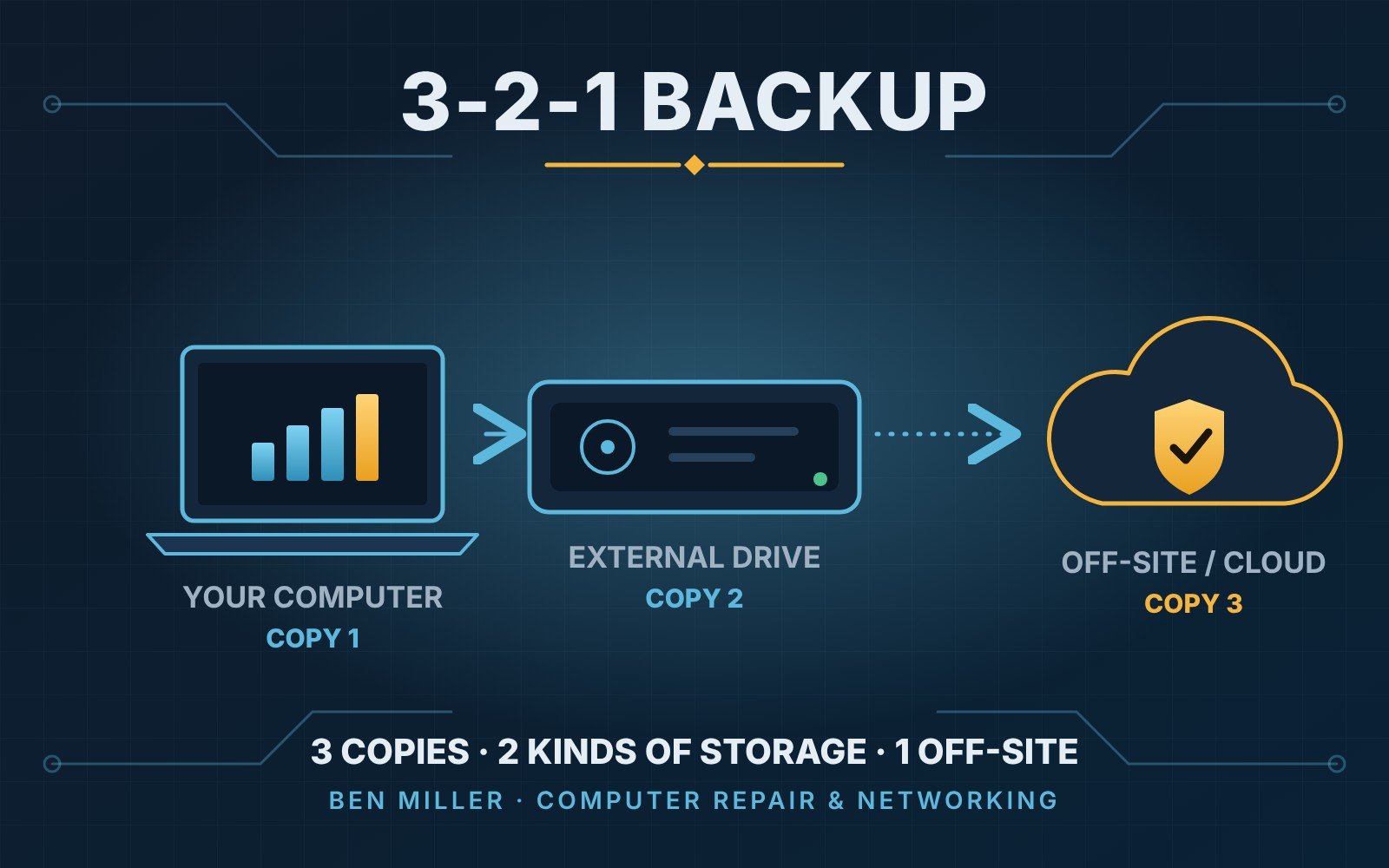
The 3-2-1 rule
This is the simple rule most professionals use, and it works for a home or a small business:
- 3 copies of anything you care about: the original plus two backups.
- 2 different kinds of storage, for example your computer and an external drive.
- 1 copy somewhere else, away from the building, such as an online backup service.
The "somewhere else" part matters most in Florida. A fire, a burst pipe or a storm that floods the house takes out the computer and the drive sitting next to it at the same time.
What to back up
Start with what you can't get back:
- Photos and videos
- Documents, tax records and financial files
- Email and contacts, if they're stored only on your computer
- Business files, customer lists and invoices
- Anything on your desktop or in your Downloads folder that you'd miss
Programs themselves don't need to be backed up. They can be installed again. The files you made with them are what count.
Three ways to do it
An external drive. A USB drive costs little and is fast. Windows has File History and Mac has Time Machine, and both can back up automatically once you plug the drive in. The weak spot is that it's easy to forget to plug it in, and it sits next to the computer.
Cloud backup. Services like OneDrive, iCloud and Google Drive keep your files online, and dedicated backup services copy your whole computer. This is your "somewhere else" copy. It works in the background, so it doesn't depend on you remembering.
Both together. For most people this is the right answer: an external drive for fast restores, and a cloud copy for disasters.
Sync is not the same as backup
Many people think their files are safe because they're in a cloud folder. A sync service mirrors your folder, so if you delete a file or ransomware scrambles it, the damage can be copied everywhere. A real backup keeps older versions you can go back to. Check that your service keeps file history and for how long.
Test it
A backup you've never tried to restore is a hope, not a plan. Once every few months, pick a file, restore it from the backup and open it. Also look at the date of the last successful backup. If it says weeks ago, something has stopped working.
Protect the backup, too
- Keep the external drive unplugged when you're not backing up, so ransomware can't reach it.
- Use a strong, unique password on your cloud account and turn on two-step sign-in.
- Don't leave the only backup in the same bag or on the same desk as the laptop.
Before hurricane season
If a storm is coming, make sure your backup is current, take your external drive with you if you leave, and unplug computers from the wall. It takes ten minutes and could save everything on them.
Want help setting it up?
I set up backups for homes and small businesses anywhere in Fort Lauderdale and Broward County, and I can do it at your place, by drop-off or remotely. You can book a time or call (786) 459-9257.